
Download the Nursingschoolpro customizable report-sheet pack — available as a print-ready PDF and an editable Word file — and start with the single-page brain sheet that matches your patient load. SBAR-ready fields are already built in, so you can convert your notes directly into a structured verbal handoff without rewriting anything.
Three steps to get started this shift:
- Print one sheet per patient (ICU: full page; med-surg: use the 4-patient grid)
- Prefill patient name, MRN, room number, DOB, allergies, and code status from the EHR at shift start
- Carry the sheet during your shift, then shred it per your facility's HIPAA policy before you leave the unit
Key Takeaways
A customizable, unit-specific nursing report sheet — prefilled from the EHR and structured around your assessment order — is the single most reliable tool for safe, efficient shift handoffs.
| Point | Details |
|---|---|
| Pick the right template | Use a full-page sheet for ICU patients; a 4-patient grid for med-surg. |
| Prefill identifiers first | Pull name, MRN, allergies, and code status from the EHR at shift start. |
| Align layout to your workflow | Reorder fields to match your assessment or med-pass sequence to reduce cognitive load. |
| Use SBAR for verbal handoff | Pre-fill Assessment and Recommendation fields during the shift, not at handoff. |
| Shred at shift end | Destroy every sheet in a HIPAA-compliant bin before leaving the unit. |
| Nursingschoolpro template pack | Includes PDF and editable Word formats for ICU, med-surg, ED, pediatrics, SBAR, and student use. |
Table of Contents
- What nursing report sheet templates are in the pack?
- What fields must every nursing report sheet include?
- How does SBAR work, and what does it look like in practice?
- How do you customize a template to fit your unit's workflow?
- Should you use paper or digital brain sheets?
- Step-by-step: download, edit, print, and secure your sheet
- What does a filled-out nursing report sheet actually look like?
- How do you give a strong verbal handoff alongside the sheet?
- What mistakes do nurses most often make on report sheets?
- What legal and documentation standards apply to nursing report sheets?
- Nursingschoolpro gives you templates and the study tools to back them up
- Sources
What nursing report sheet templates are in the pack?
The pack covers every common unit layout. Here is what is included and when each format fits best, according to NurseZee's template guidance:
Choose the PDF when you want to print immediately with no formatting adjustments. Open the Word file when you need to add unit-specific fields — vent settings, drip rates, isolation type — before printing. A med-surg grid fits several patients on a single landscape page; ICU sheets run one full page per patient because the data volume demands it.
Pro Tip: Print two copies of your ICU sheet at shift start. Keep one clipped to your clipboard and one folded in your pocket for quick reference during procedures.
What fields must every nursing report sheet include?
A sheet that is missing one critical field is worse than no sheet at all. Code status is the most dangerous omission — it must be visible at a glance, not buried at the bottom. Build your nursing report sheet template around these three tiers:
High-priority identifiers (fill these first, from EHR):
- Patient name, MRN/ID, room number, DOB
- Allergies (drug and environmental)
- Code status — bold, boxed, or highlighted
Clinical snapshot:
- Admitting diagnosis and brief history
- Current assessment by system (neuro, respiratory, cardiac, GI, GU, skin)
- Recent vital signs and trends (not just the last reading)
- Abnormal labs and pending results
Treatment and logistics:
- Active medications with scheduled times
- IV access, line types, settings, and last dressing change
- Isolation type and precautions
- Pending procedures, scheduled tasks, discharge plan
Safety flags: fall risk, restraints in use, NPO status, interpreter needed, family contact preference.
HIPAA reminder: Your report sheet contains protected health information. Never remove it from the unit, never photograph it, and shred it in a designated bin at shift end — not a regular trash can.
How does SBAR work, and what does it look like in practice?
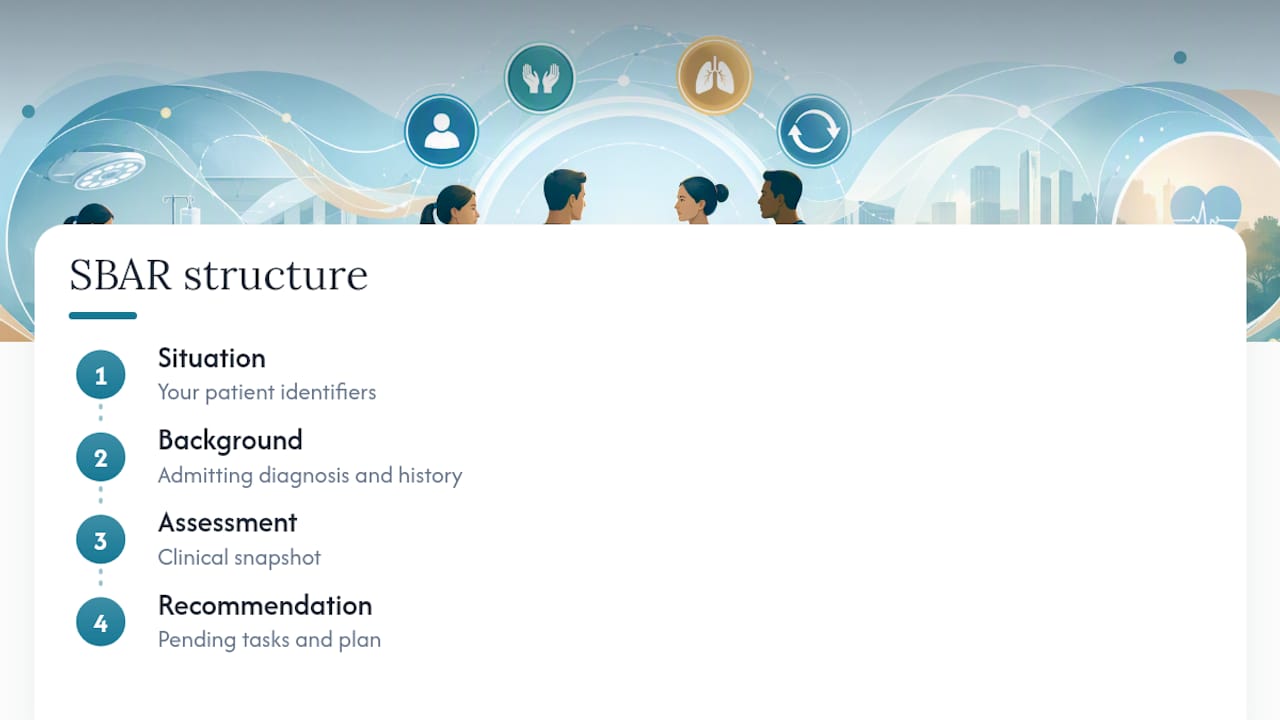
SBAR — Situation, Background, Assessment, Recommendation — is a four-part communication framework designed to make handoffs and escalation calls concise and complete. You use it at shift change, when calling a provider about a deteriorating patient, and during transfers. Johns Hopkins Medicine's one-page SBAR tool is a widely used hospital-standard version of this structure.
Example A: End-of-shift med-surg handoff
S: "I'm handing off Mr. Rivera in room 412, a 67-year-old admitted for CHF exacerbation." B: "He came in two days ago with 3+ pitting edema and a BNP of 1,840. He's been on IV furosemide 40 mg twice daily." A: "Edema is down to 1+, urine output has been good this shift, and he's satting 96% on 2L NC. Morning BMP is pending." R: "Continue current diuresis plan. Watch the BMP when it comes back — his potassium was 3.4 this morning."
Example B: Urgent escalation to provider
S: "Dr. Patel, this is Keisha calling from 6 North about Ms. Thompson in room 618. She's acutely short of breath." B: "She's post-op day 2 from a right hip replacement, no prior respiratory history." A: "RR is 28, SpO2 dropped to 88% on room air, she's anxious and diaphoretic. No improvement with repositioning." R: "I'm concerned about a PE. Requesting an order for supplemental oxygen and a STAT CT pulmonary angiogram."
Pro Tip: Pre-fill the Assessment and Recommendation fields on your report sheet during the shift — not at handoff. When something changes, write it down immediately. That way your SBAR is already drafted before you pick up the phone.
The SBAR fields on your sheet map directly to those four sections. Situation pulls from your patient identifiers; Background from the admitting diagnosis and history; Assessment from your clinical snapshot; Recommendation from your pending tasks and plan.
How do you customize a template to fit your unit's workflow?
Experienced nurses customize their brain-sheet layout to match the order of their physical assessment or med-pass routine — and that is not just a preference, it is a cognitive load strategy. When your sheet mirrors how you actually move through a shift, you spend less mental energy translating between the paper and the patient.
- Map your routine first. Write down the order you assess patients or give medications. Does your unit run head-to-toe assessments before morning meds, or do you give meds first? Your sheet should follow that same sequence.
- Adjust columns for patient load. If you carry six patients, a landscape grid with abbreviated fields beats a full-page portrait layout. If you carry two ICU patients, you want the full page.
- Add unit-specific fields. Vent settings, drip rates, CRRT parameters, or fetal heart tones — whatever your unit tracks that a generic template omits.
- Set shorthand symbols. A checkmark for completed tasks, a circle for pending, an asterisk for abnormal values. Agree on symbols with your team so the incoming nurse can read your sheet at a glance.
- Students: follow the standard template first. Resist the urge to customize before you understand why each field exists. Once you can fill every section confidently, then simplify.
Pro Tip: Run a redesigned sheet for two full shifts before committing to it. Ask the nurse taking your handoff whether anything was unclear or missing. Their feedback is the fastest way to find gaps you cannot see yourself.
Should you use paper or digital brain sheets?
Most nurses still reach for paper in high-acuity settings, and the reason is simple: paper is faster to annotate mid-code than any app. That said, digital has real advantages for shared updates and multi-provider handoffs.
Paper pros and cons:
- Fast to access and annotate, no login required
- Works in any environment, including areas with poor Wi-Fi
- PHI disposal risk: one sheet left in a pocket is a HIPAA violation
- No auto-updates; you must manually transcribe changes from the EHR
Digital pros and cons:
- Can auto-populate from the EHR, reducing transcription errors
- Shareable with the incoming team before handoff begins
- Requires a device at bedside and facility approval for the platform
- Login friction slows access during emergencies
A practical middle ground: use a digital template to prefill identifiers and labs at shift start, then print a working copy to carry. That hybrid approach captures the accuracy of EHR data and the speed of paper annotation.
For students and new nurses: Check your facility's policy before using any personal device to store or photograph patient data. The safest default is paper, shredded at shift end.
Step-by-step: download, edit, print, and secure your sheet
- Download your chosen format from the Nursingschoolpro template pack.
- Open in Word to add unit-specific fields, adjust column widths, or change orientation before printing. For immediate use, open the PDF and print as-is.
- Prefill identifiers from the EHR at shift start: name, MRN, room, DOB, allergies, code status, active meds, and any critical labs.
- Use during your shift to record assessment findings, task completions, and changes in condition. Update the Recommendation field as the plan evolves.
- Shred at shift end in a designated HIPAA-compliant bin. Never take the sheet off the unit, fold it into a bag, or photograph it.
Common print problems: If the grid cuts off, check that your printer is set to the correct paper size (Letter, 8.5 x 11) and that scaling is set to "Fit to Page." For landscape templates, confirm orientation before printing. To add a column in Word, right-click any table cell and select "Insert Column."
What does a filled-out nursing report sheet actually look like?
A blank template tells you what to include. A filled-out sheet shows you how much detail is enough — and where nurses tend to leave dangerous gaps.
Here is a realistic med-surg example for one patient slot:
Patient: Maria Santos | Room: 308B | MRN: 004821 | DOB: 03/14/1958 Allergies: PCN (rash) | Code: Full Dx: Community-acquired pneumonia, day 3
Assessment: Diminished breath sounds RLL, productive cough, improving. Alert and oriented x3. Meds due: Azithromycin 500 mg IV 0900, Acetaminophen 650 mg PO PRN (last given 0430) Labs: WBC 11.2 (down from 14.8 yesterday). CXR pending from 0800 order. Tasks: Ambulate x2 this shift, incentive spirometry q1h while awake, discharge teaching if CXR clears. Safety: Fall risk (yellow band). No isolation.

Notice what this example does: it captures trends (WBC trending down), not just single values. It flags what is pending (CXR) so the incoming nurse knows to follow up. And code status is at the top, not the bottom.
How do you give a strong verbal handoff alongside the sheet?
The sheet is a reference, not a script. Reading it line by line is the fastest way to lose the incoming nurse's attention. Use it to anchor your SBAR, then speak to the patient's story.
- Lead with the one thing that matters most. If your patient is trending toward sepsis, say that first — before room number, before diagnosis.
- State trends, not just values. "Her pressure has been dropping all shift" is more useful than "last BP was 98/60."
- Flag what is unresolved. Pending labs, unanswered provider calls, a family member who needs a callback — the incoming nurse needs to know what is still open.
- Invite questions. A 30-second pause at the end of handoff catches more errors than any checklist.
- Keep it under five minutes per patient. If your handoff runs longer, the sheet is doing too little work. Reorganize it so the incoming nurse can read the basics and you can focus on what changed.
What mistakes do nurses most often make on report sheets?
The errors that cause harm are almost never about forgetting a field. They are about filling fields incorrectly or inconsistently.
Missing or buried code status is the most cited dangerous omission. Put it at the top, every time, in every template.
Copying yesterday's assessment instead of updating it. A sheet that says "lungs clear" when the patient developed crackles at 0300 is actively misleading.
Vague medication entries. "Pain meds" is not a medication entry. Write the drug name, dose, route, and next scheduled time.
Skipping pending items. If a lab is pending or a provider call is unanswered, it must appear on the sheet. The incoming nurse cannot follow up on something they do not know exists.
Leaving the sheet in a pocket. One survey of nursing students found this was the most common HIPAA near-miss in clinical rotations. Shred it. Every shift.
What legal and documentation standards apply to nursing report sheets?
A nursing report sheet is a working document, not part of the official medical record. That distinction matters legally. The EHR is the legal record; the brain sheet is your personal shift tool. But it still contains PHI, which means HIPAA's Privacy Rule applies to how you handle, store, and destroy it.
The American Nurses Association and most state boards of nursing hold nurses accountable for any PHI breach, including a mishandled report sheet. Facilities typically require shredding in designated bins; some require nurses to sign out paper forms at shift start. Check your facility's specific policy — the standard varies.
From a liability standpoint, if a handoff error leads to patient harm, the report sheet may be requested as evidence of what information was communicated. A sheet that is incomplete, illegible, or inconsistent with the EHR can complicate a nurse's defense. Keep entries factual, legible, and current.
Documentation standards also intersect with medication accuracy — a sheet that lists the wrong dose or omits a scheduled med creates a gap between what was planned and what was given, which is exactly the kind of discrepancy that triggers incident reports.
Why these templates were built this way
These templates were designed to align with how nurses actually work — not how administrators imagine they do. The layouts follow assessment order, not alphabetical field lists. The SBAR form maps directly to the sheet's clinical snapshot section so verbal handoff takes seconds, not minutes. Every template in the Nursingschoolpro pack has been reviewed against current nursing education standards and the study resources used by nursing students preparing for HESI, TEAS, and NCLEX.
Nursingschoolpro gives you templates and the study tools to back them up
Downloading a template is one step. Knowing what every field means — and why it matters for patient safety — is the work that happens before and after the shift.
Nursingschoolpro bundles the full report-sheet template pack with practice questions for every nursing class, plus targeted prep for HESI A2, TEAS, and NCLEX. You get instant rationales for every answer, real-time analytics that show exactly where your knowledge has gaps, and a curriculum built around the same standards your instructors use. The 48-hour free trial costs nothing to start. If you want to see the pricing breakdown before committing, the full plan details are here.